Finding the perfect keyboard for typing goes beyond just ergonomic choices or price. With endless brands and buzzing forums, it’s surprisingly easy to get overwhelmed.
Mechanical and membrane keyboards, the two main types, each have distinct typing experiences—which means figuring out what actually works best for your daily routine might not be as obvious as it sounds.
This article is ideal for students, remote workers, tech hobbyists, and really anyone often tied to a keyboard.
If you're looking for more accurate, comfortable, or productive typing—and also wondering if all the hype around mechanicals is justified—you’re in the right place.
What Are Mechanical and Membrane Keyboards?
Not sure how these keyboards actually work? It turns out, the main difference is in their underlying technology. Understanding this helps clarify why people get so passionate about their favorites.
How Mechanical Keyboards Work
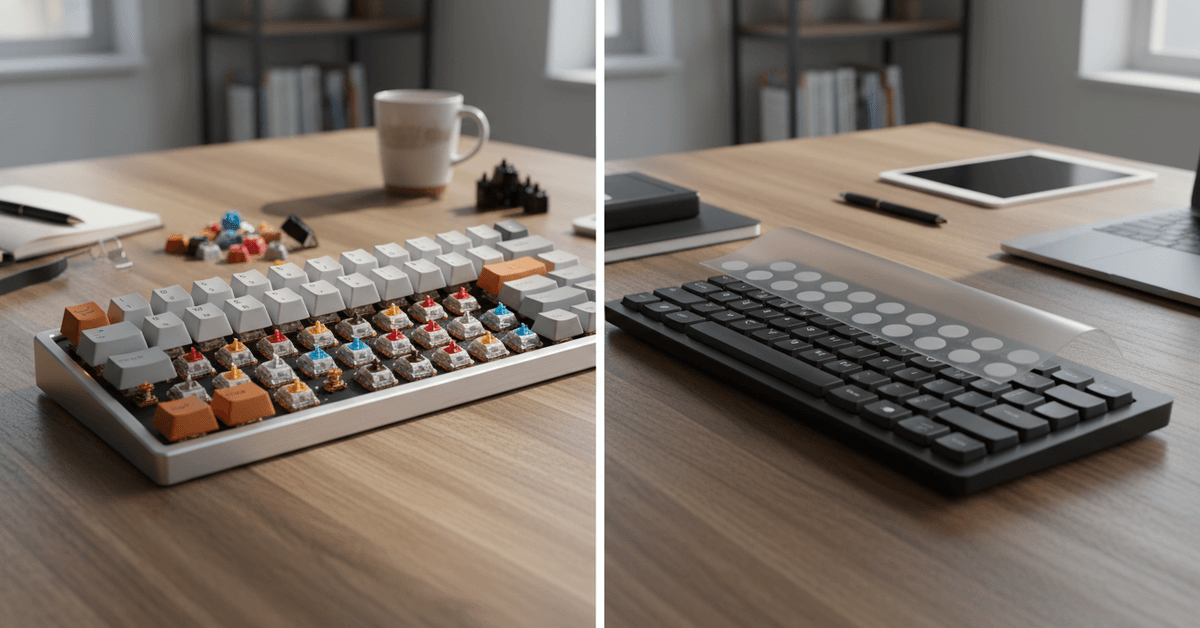
A mechanical keyboard uses individual switches for each key. Basically, when you press a key, you’re triggering a spring-loaded mechanism—this design makes each keystroke more distinct and tactile.
How Membrane Keyboards Work
In contrast, membrane keyboards have pressure pads covered by a thin, flexible membrane layer. When you press down, contact is made across a flat circuit, registering the input—but usually with much less physical feedback.
Mechanical Keyboards: The Pros and The Experience
Typing Feel: Satisfying and Distinct
There’s an almost audible "snap" to each press on a mechanical board. Personally, after swapping to one, I found I made fewer typing mistakes, perhaps just due to the extra feedback. That satisfying click can sometimes be distracting, though, especially in quiet offices—or libraries.
Durability: Made to Last
Many mechanical keyboards easily outlive their membrane counterparts. With rated lifespans between 30 and 100 million keystrokes, they’re an investment that, in theory, could last through several laptops—if not longer.
I’ll admit, I’ve dropped a coffee or two nearby without disaster (though I really try not to make a habit out of it).
Customization Potential
Mechanical boards are the darlings of the "keyboard modder" world for a reason. You can swap out switches, keycaps, and sometimes even cables—making it possible to tailor a setup that’s genuinely personal. This can also mean a deeper rabbit hole of accessories and upgrades, if that’s your thing.
Comfort and Ergonomics
This is a bit subjective. Some people find mechanical keyboards easier on the fingers, especially for long sessions.
But not everyone agrees—a few find the keys too stiff, and certain mechanicals are quite tall, potentially requiring a palm rest.
Membrane Keyboards: Quiet and Accessible
Noise: Quieter in Most Settings
One of their biggest pluses: membrane keyboards tend to be much quieter. In team spaces, study lounges, or anywhere you might worry about annoying others, the muffled key-presses can be a legit advantage.
Though, in my experience, some cheaper models can develop a slight "mushy" sound as they wear down.
Price and Availability
Membrane keyboards are usually the default in new laptops and affordable external models. If you type occasionally or have a…let’s call it creative coffee spill record, sticking to membrane might be a good strategy. Typically, they’re much less expensive—sometimes a third the cost of similar mechanical models.
Portability and Slim Profiles
Looking for something ultra-slim for a backpack or travel setup? Membrane boards are lightweight, thin, and almost always more portable. Think of most wireless keyboards in productivity bundles—odds are, they’re membrane-based.
Which Keyboard Is Better for Typing Speed?
This is a tricky subject. Typing speed on either keyboard comes down to familiarity and preference—even the most precise switches won’t magically boost your words per minute without time to adapt.
Studies and informal tests actually show split results. Some people swear by the crisp actuation of mechanical switches, while others see no measurable improvement when switching from membrane to mechanical.
Is there an edge? Mechanical switches, especially tactile or clicky varieties, can give clearer feedback, making fast typists less likely to "bottom out" or double-press.
Personally, after switching from membrane to a tactile mechanical, my accuracy improved a bit, but the raw speed was about the same after a month of use.
Comfort, Fatigue, and Wrist Health
Typing for hours on end? Ergonomics matter. Mechanical keyboards offer travel (the distance a key moves) and different "springiness" which, for some, helps avoid finger and wrist fatigue.
However, some people find the additional height or force required uncomfortable, especially with certain switch types (like heavy clicky switches).
Membrane keyboards require less force overall, but their flatter profile—especially in the ultra-slim models—can sometimes cramp the hands after extended use.
As always, using either without proper keyboard height or posture can lead to discomfort, so this isn’t entirely about the keyboard itself.
Key Considerations Before Choosing
Your Typing Style and Volume
If you type all day (think writers, editors, or coders), the feedback from a mechanical keyboard might save you some strain and improve accuracy.
On the other hand, if you’re mostly sending short emails or writing quick notes, a membrane keyboard is often more than sufficient.
Noise Preferences
Not everyone enjoys—or tolerates—a clicky office. If you're in shared or quiet environments, aim for membrane keyboards or choose "silent" or "linear" mechanical switches. It’s honestly surprising how big a difference this can make in a workday’s mood.
Budget and Upgrade Plans
Mechanical keyboards can get pricey fast, especially if you go custom or high-end. Membrane models cover budget-friendly needs, but they generally lack longevity.
For serious typing (daily for years), the higher upfront investment may make sense. Otherwise, replacing a basic keyboard every so often isn't so bad.
Popular Mechanical Keyboard Switch Types
- Linear: Smooth and quiet—no tactile bump.
- Tactile: Noticeable bump, but less noise.
- Clicky: Both a bump and an audible click.
For those not sure, tactile switches are often considered the "middle ground" for both new and experienced typists. But, honestly, trying them in person (at least once) is helpful.
Popular Membrane Keyboard Variants
- Standard Dome-Switch: Most common in office and home keyboards.
- Scissor-Switch: Common in laptops—slightly more tactile, still quiet.
- Flexible Membrane: Ultra-slim, very low profile (think travel keyboards).
While scissor-switch types usually outlast pure flexible membrane models, neither reaches the lifespan of mechanical switches.
Mechanical vs. Membrane: Which Should You Buy?
| Feature | Mechanical Keyboard | Membrane Keyboard |
|---|---|---|
| Typing Feedback | Distinct, tactile | Softer, less defined |
| Noise Level | Variable (often loud) | Generally quiet |
| Lifespan | 30–100 million keystrokes | 5–10 million keystrokes |
| Customization | Extensive | Limited |
| Price | $$–$$$ | $ |
| Portability | Usually heavier/bulkier | Lightweight/slim |
How to Test Before You Buy: Practical Tips
- Visit electronics stores or specialty retailers with demo models.
- Borrow a friend’s keyboard (with their permission, of course!).
- Check tech forums for group reviews or opinions—Reddit’s /r/MechanicalKeyboards is a solid resource.
- Remember: what feels great in a quick try may change after hours of typing. If possible, purchase from places with return policies.
Final Keyboard Choice Guide
Choosing between mechanical and membrane keyboards depends on your typing volume, comfort needs, noise tolerance, budget, and portability preferences.
Mechanical keyboards usually offer stronger feedback, longer durability, and more customization, while membrane keyboards are quieter, lighter, and more affordable.
It is also important to test the keyboard when possible because comfort can change after long typing sessions. With the right choice, your keyboard can support better accuracy, smoother workflow, and more comfortable daily use.